

 |  |  |  |  |  |  |
Garmin Search Categories
If you are creating your own maps AND need your searches to work it is important to ensure that you are using the 'correct' Garmin type numbering.. If you have hotels defined as 0x2e01 they will appear as shops If you have hotels defined as 0x6e01 they won't appear at all in your searches. The trick is to know the correct |
Check your own list in Basecamp or Mapsource Go Find --> Find Points of Interest Basecamp will only show the categories if it detects them. | 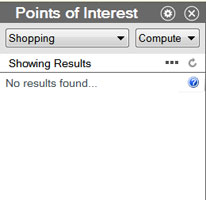 | 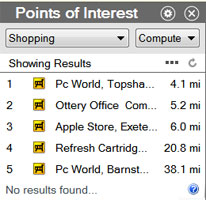 |
| before | after + 0x2E0B |
| Searchable TYPES for non NT imgs | |
| Code | |
| 0x100 - 0x1f00 | Cities,towns villages |
| 0x2000-0x 291f | Regions |
| 0x2A00 - 0x2A1F | Restaurants |
| 0x2B00 - 0x2B1F | Lodging / Hotels |
| 0x2C00 - 0x2C1F | Amenities |
| 0x2D00 - 0x2D1F | Leisure |
| 0x2E00 - 0x2E1F | Shops |
| 0x2F00 - 0x2F1F | Services |
| 0x3000 - 0x301F | Official Buildings |
| 0x5200 - 0x521F | Scenic scenes / Tourism |
| 0x5400 - 0x541F | Sport |
| 0x6400 - 0x641F | Man-made |
| 0x6500 - 0x651F | Water Features |
| 0x6600 - 0x661F | Land Features |
- Some types appear under 'Other'
- Not all types in 5200+,5400+ range are searchable
- For NT imgs and modern GPS devices higher, ie 10b00, ranges are also valid
- TYPWiz 7 gives the most up to date type range based on recent research
How to list fuel stations AND keep different fuel icons
There is a big problem listing all fuel stations and maintaining different icons for each fuel operator ( Shell,Esso etc ).
Garmin have solved this using EXTRA POIs - It still uses 2f01 as a platform and adds a reference to an extra poi - for more information see our Extra POIS page.
It uses this technique for hotels,banks,buildings etc
Solution:
amenity=fuel [0x02F01 resolution 24 continue] # make this invisible
amenity=fuel & (operator=Shell | brand=Shell) [0x6800 resolution 24]
We can do the same for banks,tourist attractions etc
POIs beginning with 2c and resolution settings
We have discovered that all pois between 0x2c00 and 0x2c1F only appear at resolution 24
Here are some common 2c pois
| 0x2c01 | Amusement Park |
| 0x2c02 | Museum |
| 0x2c05 | School |
| 0x2c0b | Church |