GSX Mapper free & available soon.
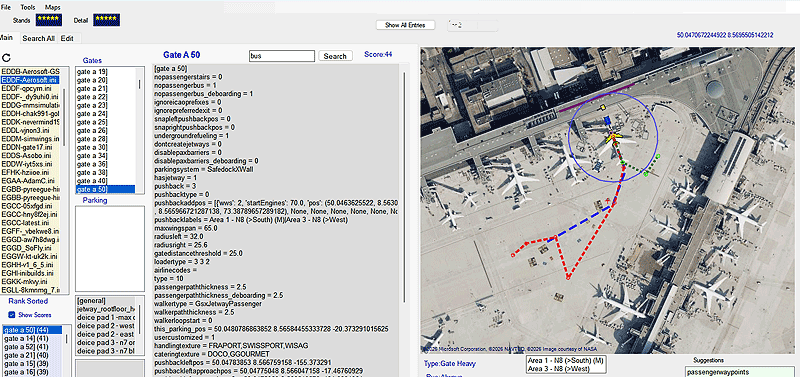
Designed to visualise GSX profiles and plot any data that can be represented on a map.
- Quickly compare different profiles for the same airport.
- Quickly pick your departure / arrival stands
- Easily select the most detailed parking slot with boarding and deboarding and no jetways
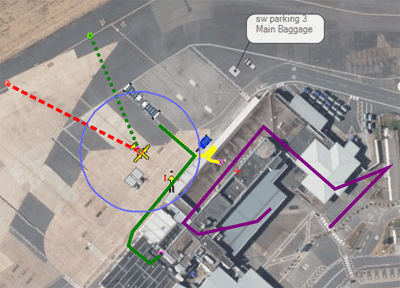
- Create your walking/boarding and deboarding routes within seconds
- Avoid jerky turns by adding extra points when making a turn.
 |
Quick Overview
Which Gate should I select? GSX Mapper is ideal to select the best GSX gate or parking slot. |
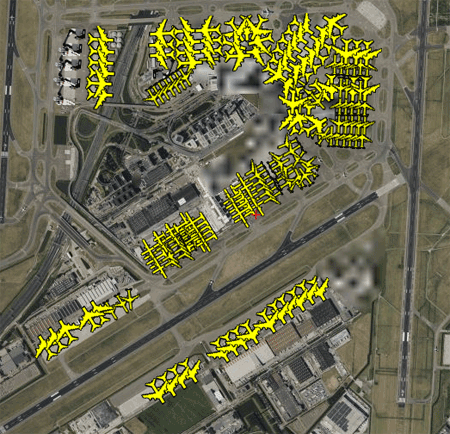 |
| Eham |
Grading
Suggestions It offers targeted suggestions to help enhance the accuracy and completeness of each slot’s data. |
 |
| Gsx Mapper 2 |
Editing Data
Positions for objects or routes can be adjusted at any time, without entering the flight simulation itself.
 |
| Eham |
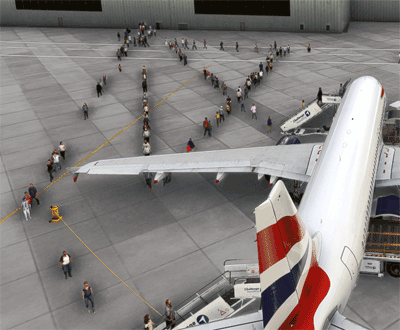
When Walkers and Passengers paths cross, GSX produces unexpected results. In addition, this profile did not include an essential: 'passengerentergatepos =' Passengetentergate scan only be placed in locations which contain sufficient data to make it valid for GSX. If you do decide to add it ,GSX throws an error with an 'isolated parking' warning causing the whole profile to become inoperative! You can still add Passenger waypoints , BUT with out an entry gate the passengers get very confused ! Tip To check if your profile is 'running' , add a a few walkerwaypoints as they are not affected.
|
Top Tip Within FSX, create a new profile by selecting all gates and parking and click / unclick Marshaller then click Apply. This trick creates a new profile. Click Refresh button to view new profile and start adding routes |
| Deboarding passengers & walkers |
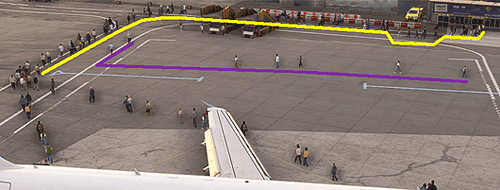 |
| Walkers & Deboarders |
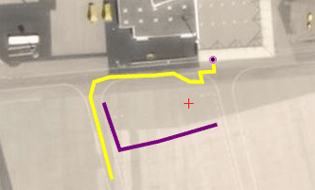 |
| Place one end of route2- 5 m from Deboarding Gate, the other beyondleft wing tip of plane |